

Discover how to activate comfort windows, coming home lights, and much more on your Golf GTI, Jetta, Tiguan, or Atlas using the powerful VCDS software.
Key Insights to Empower Your VW Customization Journey
- VCDS is Your Gateway to Advanced VW Customization: Utilize Ross-Tech's VCDS (VAG-COM Diagnostic System) to access and modify your Volkswagen's electronic control units (ECUs), unlocking features often disabled by default for regional or trim-level variations.
- Safety and Preparation are Paramount: Always back up your original coding values before making any changes. Start with simple modifications, test thoroughly, and be prepared to revert if necessary to prevent potential issues.
- Cost-Effective Personalization for US Owners: Investing in a genuine VCDS interface can save US Volkswagen owners significant money compared to dealership coding fees, which can range from $100-$200+ per feature or session.
To enable hidden features in your Volkswagen via VCDS, start by connecting a genuine Ross-Tech VCDS cable to your car's OBD2 port and your laptop. Then, use the software to access control modules for coding adaptations. This process, known as VW Hidden Features Coding, allows you to unlock options like comfort windows, coming home lights, and much more on models such as the Golf GTI, Jetta, Passat, Tiguan, and Atlas.
Demystifying VCDS: Your Gateway to Volkswagen's Digital Core
Understanding the Essential Tool for VW Customization
For any Volkswagen owner looking to delve deeper into their vehicle's capabilities, VCDS (VAG-COM Diagnostic System) is the indispensable tool. Developed by Ross-Tech, this professional-grade software and hardware system provides unparalleled access to the electronic control units (ECUs) that govern virtually every function of your VW Group vehicle (Volkswagen, Audi, Seat, Skoda). Unlike generic OBD2 scanners that offer basic diagnostic code reading, VCDS communicates using Volkswagen's proprietary protocols, allowing for intricate adaptations, detailed diagnostics, and, most importantly, the activation of latent features.
The system operates by connecting a specialized interface cable (like the HEX-V2 or HEX-NET) from your Windows laptop to your car's OBD2 port. This connection establishes a direct communication link, enabling you to read real-time data, identify fault codes, perform advanced tests, and modify vehicle behavior through coding. This deep level of interaction is why VCDS is the go-to solution for enthusiasts and professionals alike, providing a powerful alternative to costly dealership visits for feature activations.
The "Why" Behind VW Hidden Features
Unlocking Capabilities Already Present in Your Vehicle
Many Volkswagen vehicles, especially those sold in the US market, come equipped with hardware for features that are simply not activated at the factory. This phenomenon is a result of several factors:
- Regional Regulations: Features available in one country might be restricted or optional in another due to local laws or market preferences.
- Trim Levels and Packaging: To differentiate between various trim levels or optional packages, manufacturers often disable certain functionalities on lower-spec models, even if the underlying hardware is identical to higher trims.
- Marketing and Future Activation: Sometimes, features are built into the vehicle's architecture but remain dormant, reserved for future model updates or as paid upgrades.
This means your 2026 Volkswagen Jetta, for example, might have the physical components to enable automatic comfort window operation from the key fob, even if it wasn't a factory-enabled option. VCDS hidden features Volkswagen coding simply provides the software key to activate these dormant capabilities, transforming your driving experience without any physical modifications to your car.

The 2026 Volkswagen Tiguan, a prime example of a modern VW model with extensive coding potential.
Essential Gear for Your VCDS Coding Journey (US Focus)
What Every Beginner Needs to Get Started
Before you begin to how to code VW with VCDS, you'll need the right tools. For US-based Volkswagen owners, investing in genuine Ross-Tech equipment is crucial for safety and reliability.
Genuine Ross-Tech VCDS Interface
This is the heart of your coding setup. Avoid cheap, counterfeit cables, as they can cause irreversible damage to your vehicle's electronics and offer no software support. Ross-Tech offers several options tailored to different needs:
- HEX-V2 (3-VIN): Ideal for individual owners, this cable allows full diagnostic and coding functionality on up to three unique Volkswagen vehicles (identified by VIN). In the US, it typically costs around $199.
- HEX-V2 (10-VIN): Suitable for enthusiasts with multiple VWs or those who help friends and family, this version expands the VIN limit to ten. Expect a price point around $349-$400 in the US.
- HEX-NET (Wireless/Unlimited VIN): For professionals or power users, the HEX-NET offers Wi-Fi connectivity and unlimited VIN support, making it the most versatile but also the most expensive option, usually starting around $499-$699.
Compatible Windows Laptop
VCDS software runs on Windows 7 or later. Ensure your laptop is stable and has sufficient battery life, especially during coding sessions. Mac users can run Windows via Boot Camp or virtualization software, though native Windows is generally preferred.
Latest VCDS Software
Always download the most current version of the VCDS software directly from the Ross-Tech website. The software is free to download, and updates are included with your genuine interface purchase.
Your Volkswagen Vehicle
VCDS is compatible with most VW models from 1994 onwards. The best coding options are typically available on modern platforms, including:
- Volkswagen Golf (Mk5 through Mk8), especially the Golf GTI
- Volkswagen Jetta (2005-2026 models)
- Volkswagen Passat (B6 through B8)
- Volkswagen Tiguan (all generations, including the 2026 model)
- Volkswagen Atlas (2018-2026 models)
A Beginner's Guide: Step-by-Step VCDS Coding Process
Empowering Your First VW Feature Unlock
This section provides a general walkthrough for VCDS coding guide for beginners. Remember, specific coding paths can vary by vehicle model and year. Always consult reliable VCDS coding lists or forums for your particular Volkswagen.
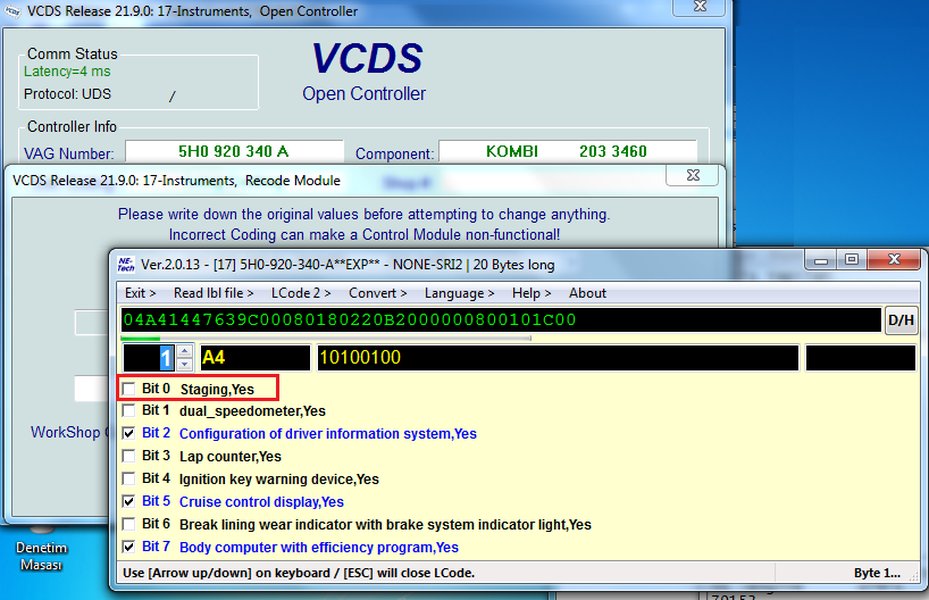
The VCDS software interface, ready for diagnostics and coding.
Step 1: Install and Configure VCDS
- Download and install the VCDS software from Ross-Tech's official website.
- Connect your genuine Ross-Tech interface cable to your laptop's USB port.
- Open the VCDS software, click "Options," then "Test" to ensure the interface is correctly detected and communicating. Click "Save" after a successful test.
Step 2: Connect to Your Vehicle
- Ensure your vehicle's battery is fully charged or connected to a smart battery maintainer to prevent voltage drops during coding.
- Locate your car's OBD2 port, usually found under the dashboard on the driver's side.
- Plug the VCDS interface into the OBD2 port.
- Turn your car's ignition to the "ON" position (engine off).
- Open VCDS and perform a full "Auto-Scan" of your vehicle. Save the generated log file. This serves as a critical baseline and backup of your car's original state.
Step 3: Access Control Modules and Backup Existing Coding
- From the VCDS main screen, click "Select Control Module."
- Choose the specific module you wish to modify (e.g., "09-Cent. Elect." for central electronics, or "17-Instruments" for the instrument cluster).
- Once connected to the module, click "Coding - 07."
- Before making any changes, use the "Long Coding Helper" feature. Copy and save the entire original long coding string to a text file. Also, take screenshots of the Long Coding Helper window.
- If working with "Adaptation - 10," export the Adaptation channel map if available.
Step 4: Modify Coding Values (Long Coding or Adaptation)
VCDS offers two primary methods for changing settings:
- Long Coding:
- Click the "Long Coding Assistant" button.
- This helper translates the complex hexadecimal coding string into user-friendly checkboxes and descriptions.
- Identify the byte and bit corresponding to the feature you want to enable or disable and check/uncheck the relevant box.
- After making your selection, click "Exit" in the Long Coding Assistant, then "Do It!" on the main coding screen to write the changes to the module.
- Adaptation:
- Click "Adaptation - 10."
- Select the specific channel you want to modify (e.g., "Coming Home/Leaving Home duration").
- Enter the "New Value," then click "Test" to preview the change.
- If satisfied, click "Save" to apply the change.
Step 5: Test and Document Your Changes
- After applying changes and cycling the ignition, test the newly activated feature to ensure it works as expected.
- Perform an "Auto-Scan" again and clear any new Diagnostic Trouble Codes (DTCs) that may have been generated.
- Crucially, document every change you make: the module, the specific coding byte/bit or adaptation channel, and the old and new values. This log is vital for future reference or if you need to revert.
Popular Volkswagen Comfort Features Coding & More
Enhancing Your Driving Experience on US Models
Many Volkswagen comfort features coding options are highly sought after by US owners across models like the Golf GTI, Jetta, Passat, Tiguan, and Atlas. Here's a look at some of the most common and desirable unlocks:
- Comfort Windows (Remote Up/Down): Allows you to open or close all windows (and often the sunroof) by long-pressing the unlock or lock button on your key fob. This is a classic example of a feature physically present but software-disabled for many US models.
- Coming Home/Leaving Home Lights: Adjust the duration that your headlights and/or taillights stay illuminated after you lock the car (Coming Home) or turn on when you unlock it (Leaving Home). This can also involve activating them without a light sensor if the hardware permits.
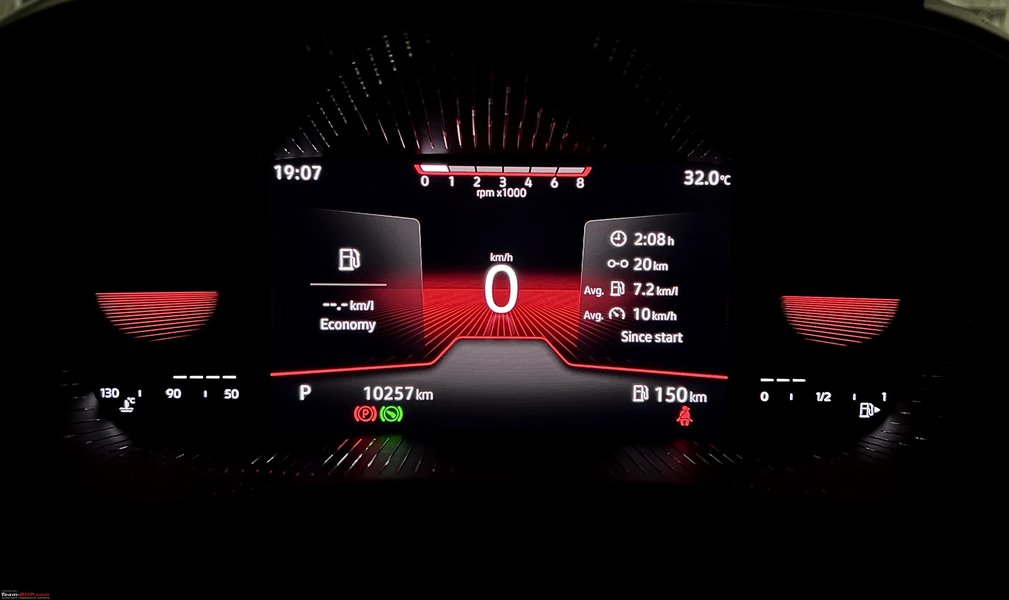
- Needle Sweep (Staging): On startup, the speedometer and tachometer needles sweep to their maximum and return to zero, often referred to as a "celebration" animation. This is a popular VW Golf GTI hidden features VCDS tweak.
- Mirror Dip in Reverse: If your vehicle has power-adjustable side mirrors, this feature automatically tilts the passenger-side mirror downwards when you engage reverse gear, providing a better view of the curb.
- Emergency Brake Flashing: Activates the hazard lights automatically during hard braking to warn following drivers.
- DRL Customization: Modify the behavior of your Daytime Running Lights (DRLs), including brightness, whether they can be turned off via the infotainment system, or enabling rear DRLs.
- Seat Belt Warning Disable: Deactivates the audible seat belt chime. (Note: Always wear your seatbelt for safety, regardless of the chime.)
- Automatic Door Locking/Unlocking: Customize when doors lock (e.g., at a certain speed) and unlock (e.g., when the key is removed from the ignition, or all doors unlock with a single press).
- Ambient Lighting Adjustments: For models equipped with multi-color ambient lighting, VCDS can sometimes unlock additional colors or intensity settings not available in the infotainment menu.
An example of the gauge sweep (staging) feature on a Volkswagen instrument cluster.
Special Considerations for 2026 Volkswagen Models
For the latest 2026 Volkswagen models like the Tiguan and Atlas, new coding possibilities are emerging as manufacturers integrate more advanced technology. While many classic features remain unlockable, newer vehicles on the MQB Evo platform may offer:
- Enhanced traffic sign recognition activation (if equipped with the necessary camera hardware).
- More granular control over driver assistance system behaviors.
- Further customization of digital cockpit displays.
- Potentially enabling "video in motion" (though local regulations should always be checked).
Feature Table: Common Unlocks with Paths (Examples)
Bridging Features to Specific VCDS Commands
The following table provides examples of popular features and their typical coding paths. Please note that exact byte/bit numbers or adaptation channels can vary significantly based on your specific Volkswagen model, year, and control module firmware. Always verify details for your vehicle on reputable forums (like VWVortex or TDIClub) or Ross-Tech's documentation before making changes.
| Feature | Control Module | Typical Coding Path (Example) | Description |
|---|---|---|---|
| Comfort Windows | 09-Cent. Elect. | Long Coding: Byte 4, Bit 2-3 (enable via remote) | Open/close all windows & sunroof by holding key fob buttons. |
| Coming Home Lights | 09-Cent. Elect. | Adaptation: "Coming Home active"; "Coming Home duration" (set seconds) | Headlights remain on for a set time after exiting the vehicle. |
| Leaving Home Lights | 09-Cent. Elect. | Adaptation: "Leaving Home active"; "Leaving Home duration" | Headlights activate when unlocking the vehicle in low light. |
| Needle Sweep (Staging) | 17-Instruments | Adaptation: "Staging" (set to active) | Instrument cluster needles sweep to max and back on ignition. |
| Mirror Dip in Reverse | 42-Door Elect, Driver / 52-Door Elect, Pass. | Long Coding: Byte X, Bit Y (enable reverse mirror dip) | Passenger mirror tilts down when reverse gear is engaged. |
| Emergency Brake Lights | 09-Cent. Elect. | Long Coding: Byte 16, Bit 6 (enable hazard flashing) | Hazard lights flash automatically during hard emergency braking. |
| Comfort Turn Signals | 09-Cent. Elect. | Adaptation: "Blinkzyklen Tippblinken" (set to 4 or 5) | Changes the number of blinks for a quick tap of the turn signal stalk. |
| Rain Closing (Windows/Sunroof) | 09-Cent. Elect. | Adaptation: "Regenschliessen" (set to active) | Automatically closes windows/sunroof if rain is detected (requires rain sensor). |
| Auto Door Lock/Unlock | 09-Cent. Elect. / 46-Convenience | Adaptation: "Central locking" channels (e.g., auto-lock speed, selective unlocking) | Customizes when doors lock/unlock, and which doors unlock on first press. |
Navigating Risks: Safety, Warranty, and What-If Scenarios
Understanding the Implications of VCDS Coding
While VCDS hidden features Volkswagen coding can be incredibly rewarding, it's essential to understand the potential risks involved. Proceed with caution and always prioritize safety.
Potential Risks of Incorrect Coding
- Module Malfunction or "Bricking": Incorrect coding can corrupt a control module, rendering it inoperable. This can lead to system errors, warning lights, or even prevent the car from starting. Replacing or reflashing a module can be expensive, often costing hundreds of dollars at a US dealership.
- Safety System Compromise: Never attempt to modify coding related to critical safety systems like airbags (Module 15), ABS (Module 03), or electronic stability control. Incorrect changes here could disable safety features, leading to dangerous situations.
- Error Codes and Unexpected Behavior: Even seemingly minor coding errors can trigger persistent Diagnostic Trouble Codes (DTCs) or cause unintended vehicle behavior.
Warranty Implications for US Owners
This is a frequently asked question, especially for US Volkswagen owners. While modifying non-critical comfort features is generally low-risk, official Volkswagen policy typically states that any unauthorized modifications to vehicle software can void the warranty. In practice:
- Dealers can often detect when a module's coding has been altered, as VCDS leaves a "fingerprint" in the module's history.
- If a warranty claim arises for a component that could reasonably be linked to your coding change (e.g., an electrical issue in the central electronics module after you modified lighting settings), the dealer might deny coverage.
- For powertrain or emissions-related issues, minor comfort coding is highly unlikely to affect your warranty.
- Best Practice: If you are concerned about warranty coverage, always revert any coding changes to their original factory settings (using your saved backups) before taking your vehicle in for service or warranty work.
What to Do If Coding Goes Wrong (How to Restore Defaults)
Despite best intentions, issues can arise. Knowing how to recover is crucial.
- Don't Panic: Most coding errors are reversible, especially if you followed the advice to save backups.
- Revert Immediately: Use the saved long coding strings or adaptation values you documented. Re-enter the original values into the affected module.
- Clear Fault Codes: After reverting, perform an Auto-Scan and clear any Diagnostic Trouble Codes (DTCs) that are present.
- Cycle Ignition: Turn the ignition off, wait 10-15 seconds, then turn it back on. This allows modules to reset.
- Troubleshoot with Community: If you're still facing issues, consult reputable online communities like VWVortex forums or TDIClub forums. Provide details of your car (model, year), the exact module, the change you attempted, and any error messages.
- Last Resort - Professional Help: If all else fails and your vehicle is immobilized or seriously malfunctioning, you may need to visit a Volkswagen specialist or dealership. They possess advanced diagnostic tools (like ODIS) that can reflash modules. Be prepared for potential costs, which in the US can range from $100-$300+ for diagnostic and reflashing services.
VCDS Pricing, Cost-Effectiveness, and Alternatives for US Users
Making the Smart Choice for Your VW Diagnostics
For US Volkswagen owners, understanding the financial aspect of VCDS is important when weighing DIY against dealership services.
VCDS Pricing in the US
As mentioned, genuine Ross-Tech VCDS interfaces range from approximately $199 for a 3-VIN HEX-V2 to $699 for an unlimited HEX-NET Pro. This is a one-time purchase, and software updates are free for the life of the product. This pricing model makes it highly attractive for long-term ownership.
Cost Comparison: DIY vs. Dealership
Consider the typical costs for coding services in the US:
- DIY VCDS Coding: Initial investment of $199-$699 for the interface. Once purchased, coding is free. Each feature activation might take 15-30 minutes.
- Independent Shop Coding: Often $50-$100 per feature or per coding session.
- Dealership Coding: Can range from $100-$200+ per feature or per hour of diagnostic/coding time. Many dealerships are also reluctant to perform "aftermarket" coding requests.
It's clear that the one-time investment in a VCDS system can quickly pay for itself, especially if you plan to unlock multiple features or own your Volkswagen for several years.
Alternatives to VCDS
While VCDS is considered the gold standard for in-depth Volkswagen diagnostics and coding, other tools exist:
- OBDeleven: A popular dongle-based tool that connects to your smartphone. It offers pre-made "Apps" for easy one-click coding of popular features and also provides basic long coding access. It's often more user-friendly for beginners but may not offer the same depth or control as VCDS.
- Carista: Another app-based solution, similar to OBDeleven, providing simplified coding options.
- Generic OBD2 Scanners: These are limited to reading/clearing generic engine fault codes and provide no access to proprietary VW modules or advanced coding functions.
For serious DIYers and those who want the most comprehensive control over their Volkswagen, VCDS remains the superior choice.
Top Tips for Successful Volkswagen Hidden Features Coding
Maximizing Your Coding Experience and Minimizing Headaches
- Document Everything: Maintain a detailed log of every change you make, including the module, the specific byte/bit or adaptation channel, and both the original and new values. This is your safety net.
- One Change at a Time: As emphasized, make one modification, test it thoroughly, then move on to the next. This isolates potential problems.
- Use the Long Coding Assistant: This VCDS feature is invaluable for translating cryptic hexadecimal codes into understandable options. Rely on its descriptions.
- Consult Forums: Online communities like VWVortex and TDIClub Forums are excellent resources for model-specific coding instructions, troubleshooting, and advice from experienced users. Search for your exact year and model.
- Keep VCDS Updated: Regularly download the latest VCDS software from Ross-Tech. Updates include new vehicle support, bug fixes, and improved coding labels.
- Stable Power Supply: Always ensure your car's battery is fully charged or connected to a charger during coding. Voltage fluctuations can corrupt modules.

The 2026 Volkswagen Atlas, a spacious SUV that benefits from enhanced comfort features through VCDS coding.
Frequently Asked Questions (FAQ) About VCDS Coding
Conclusion: Empowering Your Volkswagen Experience
The world of VW Hidden Features Coding offers an exciting opportunity for Volkswagen owners in the US to truly personalize their vehicles. By leveraging the power of VCDS, you can unlock a wealth of factory-installed features that enhance comfort, convenience, and even add a touch of unique style to your Golf GTI, Jetta, Passat, Tiguan, or Atlas. While the process requires careful attention to detail and a commitment to safety, the rewards are substantial, allowing you to tailor your Volkswagen to your exact preferences without the recurring costs of dealership visits.
Remember to invest in genuine Ross-Tech equipment, meticulously back up your original settings, make one change at a time, and lean on the extensive online community for support. With these principles in mind, you'll be well on your way to discovering the full, untapped potential hidden within your Volkswagen, transforming your driving experience into something truly bespoke.
