

Transform your Windows 10/11 laptop into a powerful diagnostic tool, saving time and money on car repairs.
- ELM327 Adapter Essential: A low-cost ELM327 adapter is the bridge between your PC and your car's OBD2 port.
- Brand-Specific Excellence: FORScan is a standout for Ford/Mazda, while OBD Auto Doctor offers broad appeal for various makes.
For home mechanics and DIY enthusiasts seeking to demystify their vehicle's check engine light, having reliable free OBD2 software for PC is a game-changer. The best options for Windows 10 and 11, such as FORScan, OBD Auto Doctor, ScanMaster ELM, FreeScan, and TOAD Lite, empower you to read fault codes, analyze live data, and perform essential car diagnostics without the hefty price tag of professional tools. When paired with an affordable ELM327 adapter, these programs transform your laptop into a powerful automotive diagnostic center, helping you troubleshoot issues on popular US car brands like Ford, Chevrolet, Toyota, Honda, Nissan, and Dodge.
Understanding OBD2 PC Software: Your Gateway to Car Health
What is OBD2 PC Software and Why Do You Need It?
On-Board Diagnostics II (OBD2) is a standardized system mandated in all vehicles sold in the US since 1996. It continuously monitors your car's major systems, such as the engine, transmission, and emissions controls, storing Diagnostic Trouble Codes (DTCs) when a problem is detected. Free OBD2 software for PC allows your Windows computer to connect to this system, giving you access to crucial information from your car's Engine Control Unit (ECU).
This connection enables you to:
- Read and Clear Diagnostic Trouble Codes (DTCs): Understand the reason behind your "Check Engine" light and extinguish it once the issue is resolved.
- Monitor Live Data Streams: View real-time sensor data, including engine RPM, vehicle speed, coolant temperature, oxygen sensor readings, and fuel trims. This helps in diagnosing intermittent problems.
- Perform Freeze Frame Analysis: Capture a snapshot of various vehicle parameters at the precise moment a fault code was triggered, providing context for the issue.
- Check Readiness Monitors: Determine if your vehicle's emissions systems have completed their self-tests, a vital step before an emissions inspection in many US states.
While professional diagnostic tools can run into hundreds or even thousands of dollars, these free OBD2 software options provide substantial functionality for a minimal investment in an adapter, making advanced diagnostics accessible to the average American car owner.
Do I Need a Special Adapter for OBD2 PC Software?
Absolutely. To use any free car diagnostic software PC on Windows, you will need an ELM327-based OBD2 adapter. This small device acts as an interface, translating data between your car's ECU and your PC. These adapters typically connect to your car's OBD2 port (usually located under the dashboard on the driver's side) and then to your PC via USB, Bluetooth, or Wi-Fi.
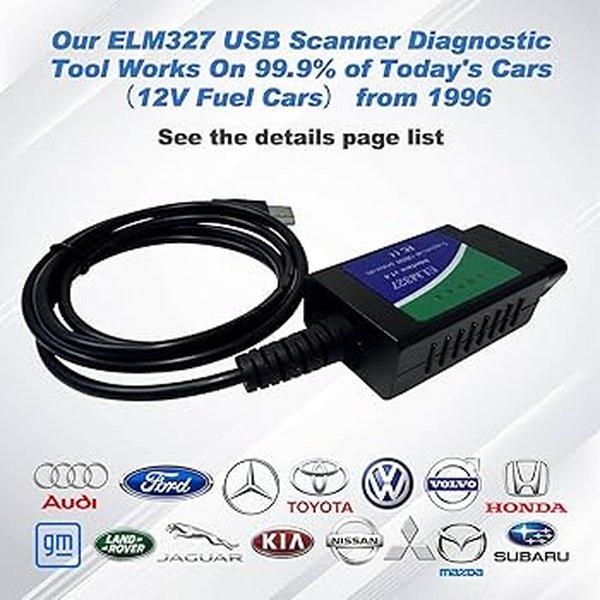
An ELM327 USB adapter, commonly used to connect a PC to a vehicle's OBD2 port.
You can find reliable ELM327 adapters for as little as $20-$60 at online retailers or local American auto parts stores like AutoZone or O'Reilly. For Windows users, a USB ELM327 adapter often provides the most stable and fastest connection, especially in environments with potential wireless interference. While Bluetooth models offer convenience, ensuring a quality adapter is key to avoiding connectivity issues.
Important Note: While many ELM327 adapters are available, some cheaper versions may not be genuine or fully compliant, leading to connectivity issues or limited functionality. It's often worth investing a little more for a reputable brand like OBDLink for robust performance and wider software compatibility.
Top 5 Free OBD2 Diagnostic Software Programs for Windows 10/11
Here’s a detailed look at the top best free OBD2 software Windows 10 and 11 users can leverage for their vehicle diagnostics:
1. FORScan: Unrivaled for Ford, Lincoln, and Mazda
FORScan stands out as the premier free OBD2 software for PC for owners of Ford, Lincoln, and Mazda vehicles. While it also offers generic OBD2 functions for other brands, its strength lies in providing deep, manufacturer-specific access to modules that generic tools often miss. This makes it invaluable for US owners of popular models like the Ford F-150, Escape, Fusion, Explorer, or Mazda CX models.
- Key Features: Advanced access to Ford-specific modules and codes, comprehensive live data graphing, service procedures, reset functions, Mode 06 monitoring, and I/M readiness.
- Compatibility: Fully compatible with Windows 10 and 11 (64-bit systems). Works best with ELM327 USB adapters that support HS-CAN and MS-CAN switching (e.g., OBDLink EX, Vgate vLinker FS).
- Pros: Exceptional Ford-specific diagnostics, fast live data streaming, active community support, and regular updates.
- Cons: Primarily Ford-centric; advanced coding and service features are brand-specific; may have a steeper learning curve for non-Ford users.
- Best Use Case: Ideal for Ford or Mazda DIYers who require dealer-like visibility and advanced module access without paying dealer prices.
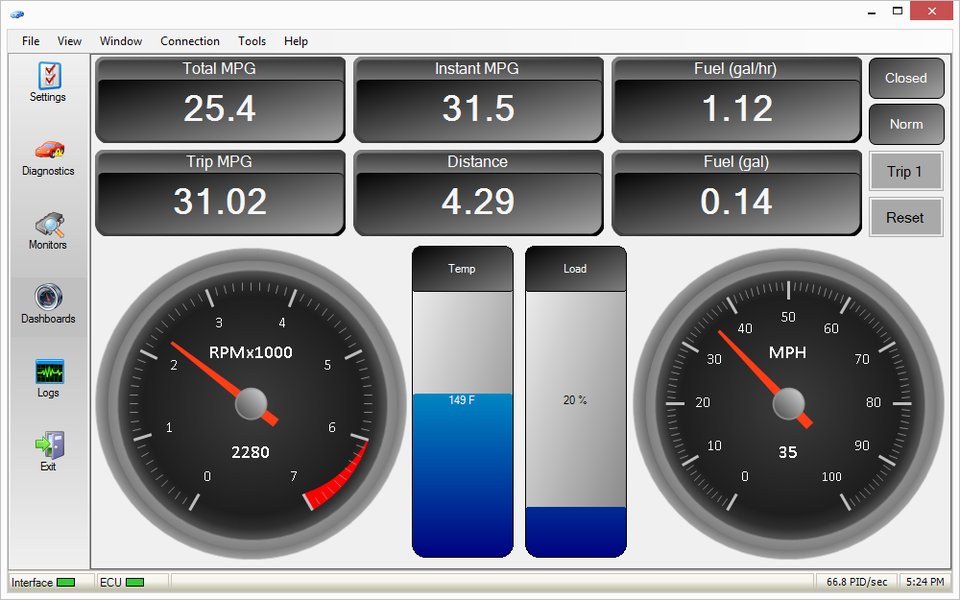
A diagnostic dashboard potentially similar to what FORScan can offer, displaying live data.
2. OBD Auto Doctor: The User-Friendly All-Rounder
OBD Auto Doctor offers one of the most intuitive and user-friendly interfaces among free ECU diagnostic software Windows options. Its clean design and straightforward approach make it an excellent choice for beginners and those looking for reliable general diagnostics. It's a robust option for a wide range of US-market cars, including Chevrolet, Toyota, Honda, Nissan, and Dodge.
- Key Features: Reads and clears stored, pending, and permanent DTCs; resets the Malfunction Indicator Light (MIL); supports Oxygen Sensor and On-Board Monitoring Tests (including Readiness Monitors); displays real-time sensor data and engine parameters.
- Compatibility: Works flawlessly on Windows 10 and 11. Supports a wide range of ELM327-based USB, Bluetooth, and Wi-Fi adapters.
- Pros: Simple and intuitive interface, good for basic diagnostics, clean presentation of data, and comprehensive diagnostic information.
- Cons: Some advanced features are reserved for the paid version, limiting the free tier's full potential.
- Best Use Case: Excellent for first-time users and home mechanics who need straightforward code reading, emissions readiness checks, and basic live data monitoring on various car brands.
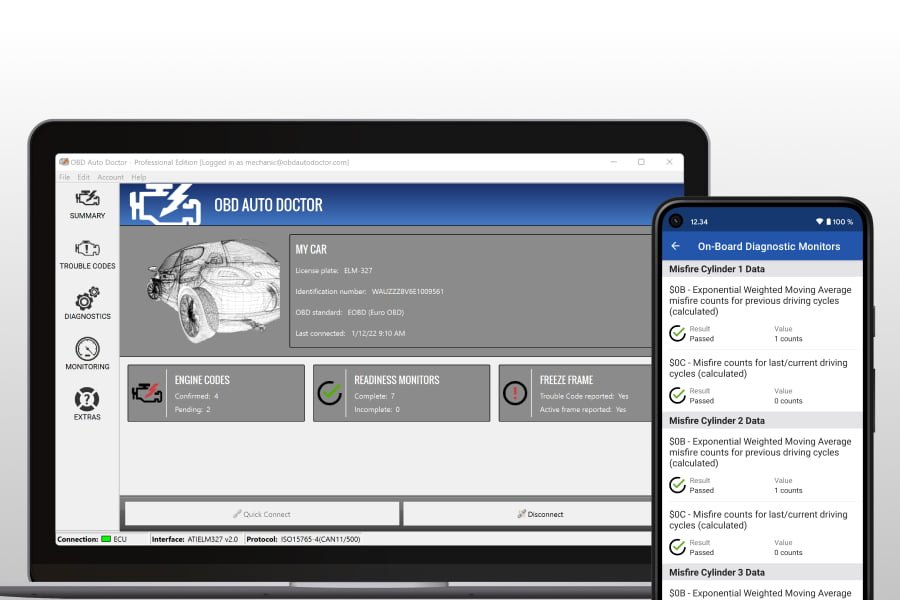
Promotional image for OBD Auto Doctor, highlighting its comprehensive diagnostic capabilities.
3. ScanMaster ELM: Broad Compatibility for ELM327 Adapters
ScanMaster ELM has been a long-standing name in the OBD2 software space, known for its broad compatibility with various ELM327 adapters. The free demo version provides sufficient functionality for basic diagnostics, making it a reliable choice for users who might have older or less common ELM327 devices. It's a solid top OBD2 PC software no cost option for reading generic codes and some live data.
- Key Features: Generic code reading and clearing, limited live data viewing, freeze frame analysis, readiness checks, and support for creating custom dashboards.
- Compatibility: Verified working on Windows 10 and 11 (64-bit systems). Renowned for its broad compatibility with most ELM327 adapters.
- Pros: Connects to a wide array of ELM327 adapters, lightweight and fast, good for users with budget ELM327 devices.
- Cons: The demo version has limitations on advanced views and data export; the interface may feel dated compared to newer software.
- Best Use Case: Ideal for users with mixed ELM327 adapters who need a no-fuss way to read generic codes and verify emissions readiness.
4. Car Scanner ELM OBD2 for Windows: Visual Data and Logging
Car Scanner ELM OBD2 offers a visually rich and highly customizable experience, especially for users who appreciate seeing live data presented in engaging dashboards and charts. This OBD2 software for Windows 11 free download transforms your device into a comprehensive vehicle performance and diagnostic tool, making it a great choice for enthusiasts.
- Key Features: Retrieves engine-related information, displays live data in customizable charts and gauges, data logging, handles Diagnostic Trouble Codes, performance analysis, and I/M readiness.
- Compatibility: Windows 10 and 11. Pairs effectively with ELM327 Bluetooth, Wi-Fi, and USB adapters.
- Pros: Visually appealing interface with flexible dashboards, strong performance monitoring features, and extensive capabilities in the free version.
- Cons: Some brand-specific PIDs might require manual setup; advanced functions may be app-specific.
- Best Use Case: Excellent for visual learners and enthusiasts who want detailed graphing and logging of live data, alongside standard diagnostics, useful for various cars like a Toyota Camry or Honda Civic.
5. EasyOBDII Software: Simple and Ultra-Light
EasyOBDII provides a straightforward and minimalist approach to OBD2 diagnostics, focusing on the essentials. It’s an excellent free OBD2 software for PC for quick, no-frills scans and basic troubleshooting. Its light footprint makes it suitable for older PCs or situations where speed and simplicity are paramount.
- Key Features: MIL status, reads stored, pending, and permanent codes, displays freeze frame data, basic live Parameter IDs (PIDs), and I/M monitors.
- Compatibility: Windows 10 and 11. Supports both USB and Bluetooth ELM327 hardware.
- Pros: Extremely lightweight, fast to connect and scan, completely free, and ideal for basic code checks.
- Cons: Limited user interface, lacks advanced functions and visual features found in other software.
- Best Use Case: Perfect for users who need a quick, reliable tool for checking the check engine light and emissions readiness, especially on common vehicles like a Ford F-150 or Chevrolet Silverado.
Choosing the Right ELM327 Adapter for Optimal Performance
Which Adapter Works Best with Each Software?
The performance of your free OBD2 software for PC heavily relies on the quality and compatibility of your ELM327 adapter. While most software works with generic adapters, certain pairings offer enhanced stability and feature access:
- For FORScan: An OBDLink EX (USB) or OBDLink MX+ (Bluetooth) is highly recommended. These adapters provide superior stability and the critical HS-CAN and MS-CAN switching capabilities necessary for deep Ford/Mazda module access. You can often find these at American auto parts stores or online for around $70-$120.
- For OBD Auto Doctor: Most reputable ELM327 USB or Bluetooth adapters will work well. Vgate USB models or quality OBDLink SX/EX/MX+ adapters offer simple setup and fast pairing, ensuring smooth data flow for a wide range of US cars.
- For ScanMaster ELM: This software is known for its broad ELM327 compatibility, even with some budget-friendly or older adapters. While it's flexible, opting for a mid-range ELM327 will prevent frustrating connection drops and data inconsistencies.
- For Car Scanner ELM OBD2: For high-rate live data streaming and responsive dashboards, a robust ELM327 Bluetooth or USB adapter, such as an OBDLink MX+, is ideal. This ensures a fluid experience when visualizing real-time engine parameters.
- For EasyOBDII: Given its minimalist nature, almost any dependable USB ELM327 adapter will suffice. The focus here is on simplicity and quick code reads, so a basic yet reliable wired connection is often preferred.
Pro tip for US consumers: Look for adapters with good reviews on popular platforms like Amazon or check recommendations from reputable automotive forums. Avoiding ultra-cheap "ELM327 v2.1" clones is crucial, as they often have limited protocol support and frequent connectivity issues.
Buying Guide: Selecting Your Ideal Free OBD2 Software
Matching Software to Your Car and Diagnostic Needs
Choosing the best free OBD2 diagnostic programs depends largely on your vehicle's make, your technical skill level, and the specific diagnostic tasks you aim to perform. Consider these factors:
- Your Vehicle's Make and Model:
- Ford, Lincoln, Mazda: FORScan is the undeniable champion for deep dives into these brands. Pair it with a compatible ELM327 adapter that supports HS-CAN/MS-CAN.
- Chevrolet, Toyota, Honda, Nissan, Dodge (General Purpose): OBD Auto Doctor (free tier) and Car Scanner ELM OBD2 are excellent choices for their user-friendly interfaces and robust feature sets, covering a broad spectrum of common US cars.
- Older GM Models: FreeScan can be a niche but effective tool for diagnosing specific General Motors vehicles.
- Your Technical Skill Level:
- Beginners: EOBD-Facile, OBD Auto Doctor, or EasyOBDII offer simpler interfaces for quickly reading and clearing fault codes and checking basic parameters.
- Intermediate DIYers: Car Scanner ELM OBD2 and ScanMaster ELM provide more detailed live data, graphing, and customization options.
- Advanced Enthusiasts: FORScan (for Ford/Mazda) offers the deepest level of control and insight, catering to more experienced users.
- Required Features:
- Basic Code Reading and Clearing: EasyOBDII or ScanMaster ELM are quick and effective for simply turning off a check engine light.
- Live Data and Logging: Car Scanner ELM OBD2 excels with its customizable dashboards and logging capabilities. OBD Auto Doctor also offers solid live data analysis.
- Emissions Readiness Checks: All listed software can help you verify if your vehicle is ready for its state emissions test.
- Manufacturer-Specific Diagnostics: FORScan is the go-to for Ford/Mazda owners needing advanced system access.
- Windows Compatibility: All the recommended software options are compatible with Windows 10 and 11, ensuring a smooth experience on modern PCs.
Limitations: Free vs. Professional Diagnostic Tools
While free OBD2 software for PC offers incredible value, it’s essential to understand its limitations when compared to professional, often dealer-level, diagnostic tools:
- Manufacturer-Specific Codes and Modules: Free software often excels at reading generic OBD2 codes (P0xxx). However, many car manufacturers (e.g., Ford, GM, Toyota) have proprietary codes (e.g., Uxxxx, Bxxxx, Cxxxx) that free tools may not fully decipher or clear. Professional tools provide deeper access to these manufacturer-specific systems like ABS, SRS (airbag), and transmission modules.
- Advanced ECU Functions: Free software generally cannot perform advanced functions such as ECU reprogramming, key coding, module initialization, or complex bidirectional controls (e.g., actively testing components like fuel pumps or ABS solenoids). These capabilities are typically reserved for expensive professional scan tools like Snap-on, Autel, or specialized brand-specific devices.
- Depth of Live Data: While free tools show live data, paid software or dedicated professional scanners often access a much broader range of Parameter IDs (PIDs) and offer more detailed, high-resolution analysis capabilities.
- Software Updates and Support: Free software might have less frequent updates or dedicated customer support compared to paid solutions, though active community forums often exist for popular free tools like FORScan.
For a typical home mechanic addressing common issues on their family sedan or truck, the capabilities of free OBD2 software, combined with a good ELM327 adapter, are usually sufficient. However, for intricate diagnostics, specialized vehicle functions, or complex repairs, professional tools remain necessary.
Tips for Maximizing Your Free OBD2 Software Experience
Getting the Most Out of Your Free Diagnostic Tools
To leverage your free ECU diagnostic software Windows installation to its full potential, follow these expert tips:
- Understand Diagnostic Trouble Codes (DTCs): When your "Check Engine" light illuminates, read the DTCs. Then, research these codes online using reliable automotive resources (e.g., O'Reilly Auto Parts, AutoZone websites) to understand potential underlying issues and common fixes.
- Monitor Live Data Actively: Don't just read codes; observe live data streams. For instance, if you suspect an oxygen sensor issue, watch its voltage readings in real-time. Fluctuations and values outside the normal range can pinpoint problems with the sensor or related systems.
- Utilize Freeze Frame Data: This invaluable feature captures vehicle conditions (engine speed, load, coolant temperature, fuel trims, etc.) at the exact moment a fault code was triggered. This "snapshot" provides crucial context, helping diagnose intermittent problems that might not appear during active testing.
- Check Readiness Monitors Before Inspections: Prior to an emissions test, ensure all readiness monitors are marked "Complete." If any are "Incomplete," your vehicle might fail the inspection. Performing specific driving cycles can help complete these monitors.
- Keep Software Updated: Regularly check for updates for your chosen free OBD2 software for PC. Developers often release improvements, bug fixes, and sometimes even new features that enhance compatibility and diagnostic accuracy.
- Ensure a Stable Connection: A reliable ELM327 adapter is critical. If you experience frequent disconnections, slow data transfer, or incomplete scans, your adapter might be the bottleneck. Invest in a quality device for consistent performance.
- Log Data for Deeper Analysis: Many programs allow data logging. Record sensor data during test drives, especially when a problem occurs, for later, more detailed analysis. This can be particularly useful for diagnosing elusive intermittent faults.
A DIY mechanic using an OBD2 scanner connected to a laptop to diagnose car issues.
FAQ: Common Questions About Free OBD2 Software for PC
Conclusion: Empowering Every DIY Mechanic
The landscape of automotive diagnostics has dramatically evolved, putting powerful tools directly into the hands of home mechanics and DIY enthusiasts. With the availability of robust free OBD2 software for PC, coupled with an affordable ELM327 adapter, anyone can transform their Windows 10 or 11 laptop into a capable diagnostic station. Whether you're troubleshooting a persistent check engine light on your Ford F-150 with FORScan, monitoring live data on your Honda Civic with OBD Auto Doctor, or preparing your Toyota for an emissions test, these tools offer unparalleled value.
While acknowledging their limitations compared to expensive professional equipment, the functionality provided by these free programs covers the vast majority of common diagnostic needs for the average US car owner. By understanding how to effectively use these tools, monitoring live data, and interpreting Diagnostic Trouble Codes, you can save significant money, gain a deeper understanding of your vehicle's health, and approach car maintenance with newfound confidence. Embrace the power of free automotive diagnostics and take control of your vehicle's well-being.
Recommended Resources for Deeper Insights
- Unlocking Tomorrow's Drive: How Over-the-Air Updates Are Revolutionizing Your Car
- Unleash Your iPhone: The Wireless CarPlay Revolution is Here!
- Unleash Your Engine's True Potential: The Definitive ECU Remapping Guide
