

Uncover what your connected car collects, how it's used, and how to reclaim your privacy on the road.
Key Insights into Car Data Privacy:
- Extensive Data Collection: Modern vehicles gather a vast array of personal data, including location, driving habits, biometric information, and smartphone sync data, often sharing it with manufacturers and third parties.
- Your Rights & Control: While some data collection is essential for safety, drivers have increasing rights under US laws like the CCPA to understand, manage, and opt-out of many data sharing practices.
- Proactive Management is Key: Effectively managing your car's privacy requires regularly checking in-vehicle settings, utilizing manufacturer apps, understanding privacy policies, and adopting smart habits for smartphone integration and third-party apps.
Modern vehicles are technological marvels, offering unprecedented convenience, safety, and connectivity. However, this advancement comes with a significant trade-off: extensive data collection. Many drivers are understandably asking: Is my car spying on me? The short answer is, your connected car likely collects a surprising amount of personal data, from your precise location to your driving habits, and often shares it with manufacturers and various third parties. This comprehensive guide will explain the intricate world of car data privacy software, detail what data is collected, how it's utilized, and most importantly, provide actionable steps on how to disable car data tracking to protect your privacy and regain control over your vehicle's information.
What Data Does My Car Actually Collect? Unveiling Connected Car Telematics
Today's cars are essentially sophisticated computers on wheels, equipped with numerous sensors and advanced telematics systems that continuously gather information. This vehicle data goes far beyond basic diagnostics, painting a surprisingly detailed picture of your daily life and driving behavior.
A Deep Dive into the Data Streams
Here's a breakdown of the primary types of data modern connected cars collect:
- Location Data: This is perhaps the most sensitive data collected. Through GPS and cellular connectivity, your car tracks your real-time position, frequent destinations, routes taken, and even where you park or charge your electric vehicle. This creates a precise history of your movements.
- Driving Behavior Data: Your vehicle monitors and records detailed aspects of your driving style, including speed, acceleration, braking patterns, cornering forces, and even seatbelt usage. Some systems can detect rapid accelerations or hard braking, which can be compiled into a "driving score."
- Biometric Information: Increasingly, cars feature advanced systems that collect biometric data. This can include facial recognition for driver identification, fingerprint data for keyless entry or ignition, and voice commands, which may be recorded and analyzed. Cabin cameras in some vehicles also monitor driver attention and passenger activity.
- Smartphone Sync Data: When you connect your smartphone via Bluetooth, Apple CarPlay, or Android Auto, your car's infotainment system can access and sometimes store data from your device. This often includes contacts, call logs, text messages, browsing history, and data from specific apps, depending on the permissions granted.
- Vehicle Health and Diagnostics: Your car constantly monitors its own performance. This includes diagnostic trouble codes, battery status, tire pressures, fluid levels, maintenance needs, and information about crash events (often stored in an Event Data Recorder, or "black box").
- Infotainment and App Usage: Data related to your in-car entertainment choices, navigation searches, assistant requests, streaming preferences, and any in-car purchases are also collected.
Many manufacturers claim this data collection is for improving vehicle performance, enhancing safety features, and providing convenient connected services. However, the sheer volume and granularity of this data raise significant questions about privacy.
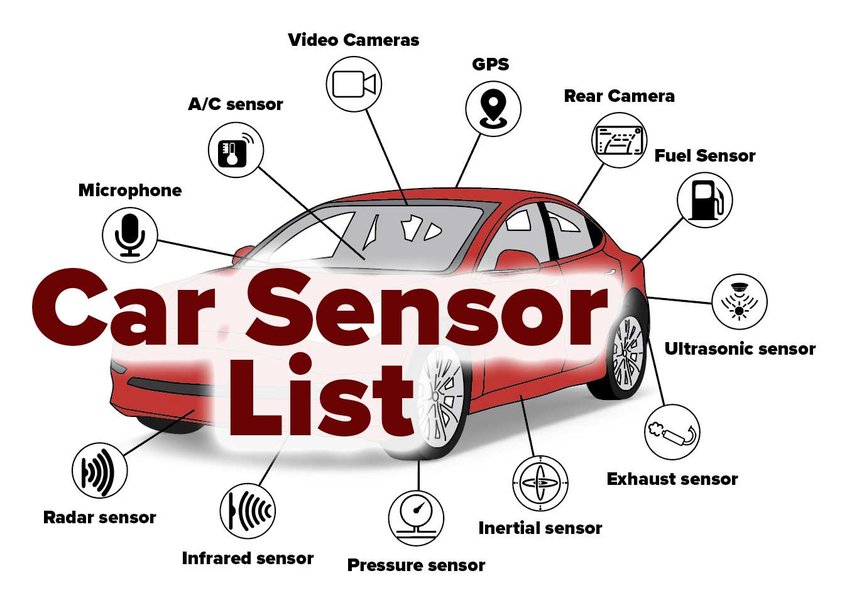
An illustration of the various sensors in a modern car that contribute to extensive data collection.
How Do Car Manufacturers Use Your Collected Data?
The data your vehicle gathers isn't just stored; it's actively used and often shared. While some uses directly benefit the driver, many serve commercial purposes that extend beyond the immediate functionality of your car.
The Many Avenues of Data Utilization
- Product Development and Improvement: Automakers use aggregated and anonymized data to improve future vehicle models, refine existing features, enhance safety systems, and optimize performance based on real-world usage patterns.
- Service Delivery and Safety: Data enables crucial services like automatic crash notifications (e.g., OnStar), roadside assistance, remote diagnostics, stolen vehicle recovery, and over-the-air (OTA) software updates.
- Marketing and Personalization: Collected data, especially location history and infotainment preferences, can be used to build detailed consumer profiles. This allows for targeted advertising, personalized offers, and in-car commerce.
- Selling Data to Third Parties and Data Brokers: A significant concern is the practice of manufacturers selling vehicle data to data aggregators and brokers, such as LexisNexis and Verisk Analytics. These companies then package and sell this information, often to insurance providers. Many automakers, through their privacy policies and terms of service, reserve the right to sell or share your personal data. Recent reports indicate that over 84% of automakers share user data with outside parties, and 76% claim the right to sell it.
- Insurance Telematics Programs: Many car brands offer or participate in telematics programs where driving behavior data is directly shared with insurance companies. While these programs might offer potential discounts for "safe" driving, they can also lead to increased premiums if your driving habits are deemed risky. Examples include GM's Smart Driver and Toyota's Insure Connect.
- Government and Law Enforcement Requests: Over half of automakers acknowledge that they may share collected customer data with government or law enforcement agencies upon request, sometimes without requiring a warrant. This raises significant concerns about privacy and potential misuse in legal contexts.
As privacy expert Andrea Amico, founder of Privacy4Cars, states, "Cars have become giant electronic devices that collect a lot of personal data. The level of detail and transparency varies across manufacturers."
Which Car Brands Collect the Most Data? (US Focus, 2026 Comparison)
While virtually all modern vehicles with connected features collect data, the extent and transparency of these practices vary widely among manufacturers. Recent analyses, such as a Mozilla Foundation report, have highlighted significant privacy shortcomings across the automotive industry, labeling cars as "the official worst category of products for privacy."
Comparing Leading US Brands
Here's a general overview of data collection practices among popular US car brands as of 2026. Remember that specific models and software versions can have different capabilities and settings.
| Brand (US) | Typical Data Collected | Key Data Sharing & Use | General Opt-Out Difficulty |
|---|---|---|---|
| Tesla | Location, driving behavior (Autopilot/FSD data), video (Sentry/Cabin Camera), diagnostics, app usage, biometric data. | Internal R&D, service providers, potentially third parties for insurance. Integrates heavily with its own ecosystem. | Moderate. Requires navigation through touchscreen menus and app settings. Some data is integral to features like FSD training. |
| Ford (incl. Lincoln) | Location, driving behavior, vehicle diagnostics, connected services data, smartphone sync data. | Internal R&D, service providers, insurance programs (e.g., Smart Driver), marketing firms. | Moderate. Settings in SYNC system, FordPass/Lincoln Way app, and potentially customer service calls. |
| General Motors (Chevy, GMC, Cadillac, Buick) | Driving behavior (OnStar Smart Driver), location, vehicle health, infotainment usage, smartphone sync. | Internal R&D, service providers, insurance companies, data brokers (e.g., LexisNexis, Verisk Analytics). | Difficult. Requires multiple steps: in-vehicle settings, OnStar app, and direct customer service contact (often in writing) to fully opt out. |
| Toyota (incl. Lexus) | Location, driving data, vehicle health, smartphone sync data, app-based program data (Drive Pulse, Insure Connect). | Internal R&D, affiliates (Connected Analytic Services), service providers, insurance companies. | Moderate. Manage through Toyota/Lexus app's Data Privacy Portal or by contacting customer care (e.g., via SOS button). |
| Honda (incl. Acura) | Location, driving patterns, vehicle diagnostics, infotainment usage, smartphone sync. | Internal R&D, service providers, marketing partners, potentially third parties. | Moderate. Settings often in infotainment system, mobile apps, and may require contacting customer service for full opt-out. |
| Hyundai (incl. Kia, Genesis) | Driving behavior, location, infotainment usage, diagnostics, Blue Link/UVO connected services data, potentially sensitive personal data. | Internal R&D, service providers, data brokers, insurance partners, third parties. | Moderate. Manage through infotainment system settings, mobile apps, and customer service. |
Nissan has been noted for its relative transparency in detailing data collection in its privacy notices, although the volume of data collected is still significant.
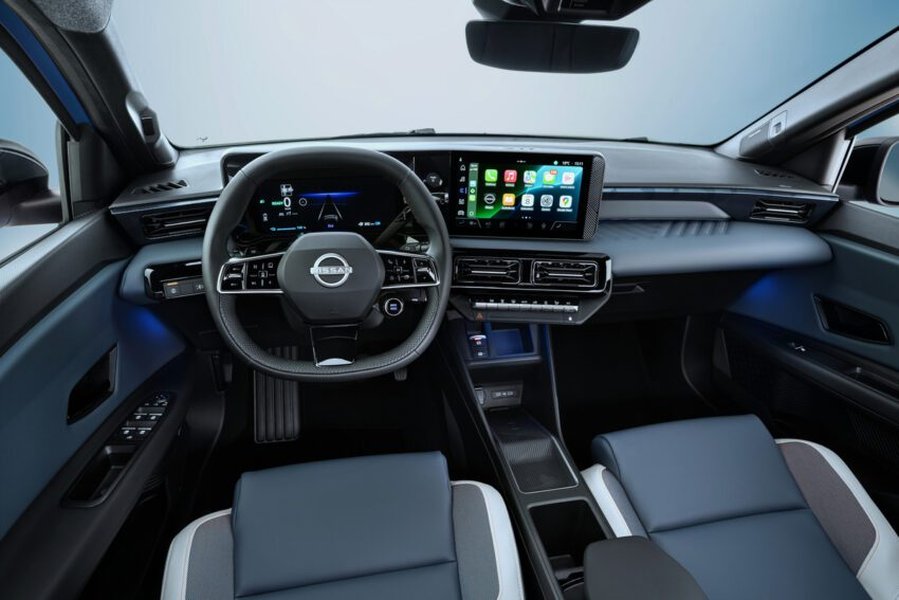
A modern vehicle interior showcasing an infotainment screen, often the gateway to privacy settings.
How to Disable Car Data Tracking: A Step-by-Step Guide
While completely preventing all data collection from a modern connected car is often impossible due to safety and regulatory requirements, you can significantly limit what your vehicle collects and shares. This involves navigating privacy settings within your car and its associated apps.
General Steps for Most Brands
- Explore In-Vehicle Settings: Access your car's infotainment system. Look for menus like "Settings," "Privacy," "Data Sharing," "Connected Services," or "Connectivity." This is where you'll find toggles for location tracking, diagnostic data transmission, and third-party sharing.
- Utilize Manufacturer Mobile Apps: Most major automakers have companion apps (e.g., FordPass, MyChevrolet, Toyota App). These apps often have dedicated "Privacy" or "Account" sections where you can manage data preferences, opt out of telematics programs, and revoke consents.
- Consult Your Owner's Manual: For precise, model-specific instructions, your vehicle's owner's manual (physical or digital) is an invaluable resource.
- Contact Customer Service: If you can't find specific settings or want to ensure a complete opt-out from certain services, contact the manufacturer's customer support. For instance, OnStar users might need to call to opt out of the Smart Driver program. Follow up in writing to document your request.
- Disable Wi-Fi and Bluetooth When Not in Use: Turning off these features in your car can prevent automatic connections and data transfers to and from external devices or networks.
Specific Tips for Popular US Brands
Tesla Privacy Settings
- On the touchscreen: Tap the car icon > "Safety & Security" (or "Privacy") > disable "Data Sharing," "Sentry Mode Camera Analytics," and "Cabin Camera Analytics" if you don't want data sent.
- In Navigation settings: Disable "Share Trip Data."
- In the Tesla app: Review "Manage Data" or "Account" consents and remove unneeded third-party app connections.
- Avoid linking contacts/messages when pairing your phone; deny sync permissions.
Ford and Lincoln Privacy Settings
- On your vehicle's SYNC system: Access "Settings" > "Connectivity Settings" > "Connected Vehicle Features" and disable unnecessary services.
- In the FordPass/Lincoln Way app: Go to "Account" > "Data Privacy & Settings" > "Manage Preferences" and disable "Connected Services" and "Marketing Communications." Unenroll from any insurance telematics programs.
General Motors (Chevrolet, GMC, Cadillac, Buick) Privacy Settings
- Press the OnStar button in your vehicle and request to opt out of data sharing programs.
- Alternatively, call OnStar customer service at 1-888-4ONSTAR. Be specific that you want to disable all non-essential data collection and follow up in writing.
- In your vehicle's infotainment system, navigate to "Privacy" or "Connectivity" to review and disable optional data sharing.
Toyota and Lexus Privacy Settings
- Via the Toyota/Lexus app: Access "Account" > "Data Privacy Portal" to disable "Drive Pulse" and "Insure Connect."
- In the vehicle: Go to "Settings" > "Privacy" > "Connected Services" and disable optional data sharing. You can also press the SOS button to speak with an agent and request deactivation of connected services.
Hyundai and Kia Privacy Settings
- On your infotainment system: Access "Settings" > "Privacy" or "Data Settings" and disable "Data Collection for Marketing" and "Location Services" unless actively needed for navigation.
- Through the mobile app (Bluelink/UVO): Go to "My Profile" > "Privacy Settings" > "Manage Permissions" to adjust data sharing.
Important Note: Disabling certain connected services may also deactivate beneficial features like emergency assistance, remote vehicle controls, or real-time traffic updates. Evaluate these trade-offs based on your personal needs and comfort level.
Electric Car Privacy Settings Guide: Special Considerations for EVs
Electric vehicles (EVs) introduce an additional layer of data collection related to their unique operational characteristics. While many general privacy practices apply, EVs gather specific types of telemetry that can reveal even more about your habits.
Unique Data Points for EVs
- Charging Habits and Locations: Your EV tracks where and when you charge, revealing your home address, workplace, and frequented public charging stations. It also monitors charging schedules and preferred charging networks.
- Battery Health and Performance Metrics: Data on battery degradation, charging cycles, fast-charging frequency, and overall energy consumption patterns is collected to optimize battery life and vehicle performance.
- Energy Consumption Patterns: How efficiently you drive, regenerative braking usage, and the impact of climate control on range are all monitored.
EV-Specific Privacy Measures
To enhance your privacy in an electric vehicle:
- Disable "Smart Charging" Features: These features often share your charging patterns with energy providers or the manufacturer.
- Limit Location Sharing with Charging Networks: Review privacy settings within charging station apps. Use RFID cards instead of apps at public chargers if you prefer not to link your usage to a digital profile.
- Avoid Saving Home Charger as a Named Favorite: Instead of labeling your home charging location explicitly, use a nearby public landmark or a general area to obscure its precise address.
- Turn Off Automatic Log Sharing: Many EVs have options to automatically share charging logs with brand accounts or energy partners; disable these if you don't use the related services.
Your Legal Rights: Navigating US Privacy Laws (2026 Context)
The landscape of American data protection laws is evolving, offering drivers more rights regarding their vehicle data. While there isn't a single federal law specifically governing connected car data, existing and emerging state laws provide significant protections.
The California Consumer Privacy Act (CCPA) and Beyond
- Right to Know: California residents (and often, by extension, all US consumers through voluntary automaker policies) have the right to request what specific personal information a company has collected about them.
- Right to Delete: You can request that companies delete personal information they hold about you, with some exceptions for safety or service necessity.
- Right to Opt-Out: You can direct companies not to sell or share your personal information, particularly for targeted advertising.
- Right to Correct and Limit Sensitive Data Use: New amendments, like those under the California Privacy Rights Act (CPRA), provide specific rights to correct inaccurate data and limit the use of sensitive personal information, including precise geolocation and biometric data.
Beyond California, several other US states, including Virginia (VCDPA), Colorado (CPA), Connecticut (CTDPA), and Utah (UCPA), have enacted similar comprehensive privacy laws. Texas also has its own data privacy act (TDPSA) going into effect in 2024. These laws empower consumers with greater control over their personal data, including information collected by connected vehicles.
Federal Oversight and Enforcement
The Federal Trade Commission (FTC) has long monitored connected car data privacy under its mandate to prevent unfair or deceptive trade practices. The FTC has issued warnings and taken enforcement actions against companies for alleged illegal collection, use, and disclosure of personal data, especially sensitive location information. If you suspect improper sharing of your vehicle data, consider filing a complaint with the FTC or your State Attorney General.
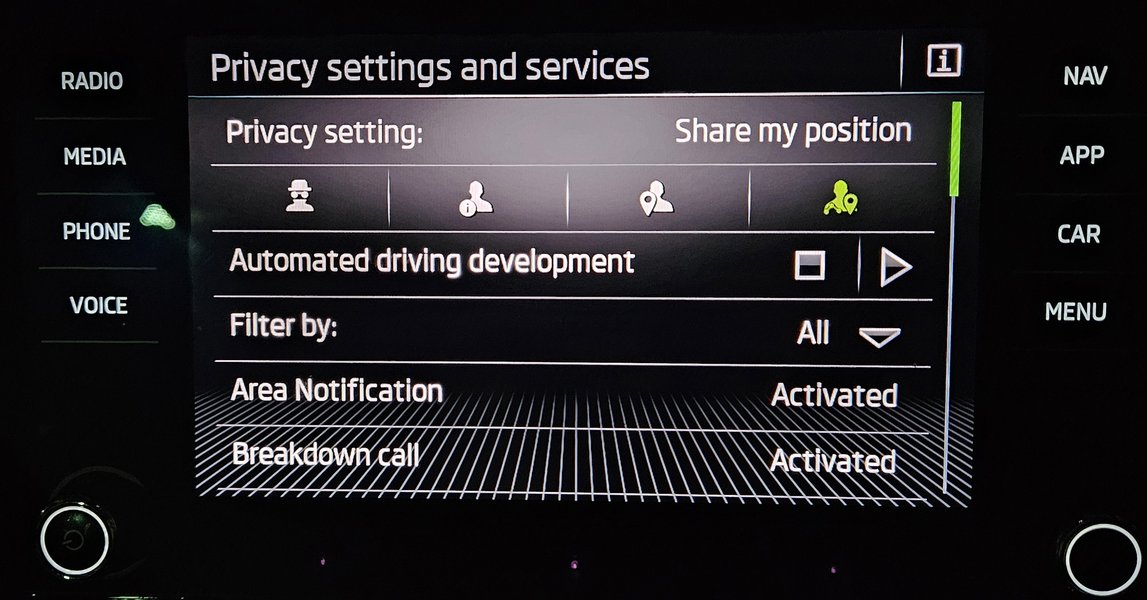
A data transfer warning message, common in connected cars, prompting user awareness.
Protecting Your Privacy When Using Smartphone Integration
Connecting your smartphone to your vehicle’s infotainment system is convenient but also creates another pathway for data sharing. It’s crucial to manage this connection wisely to minimize connected car privacy risks.
Best Practices for Smartphone Connectivity
- Limit Permissions: When pairing your phone via Bluetooth or using Apple CarPlay/Android Auto, carefully review the permissions requested. Only grant access to contacts, messages, or calendars if absolutely essential for your driving needs. You can often manage these permissions directly on your smartphone's settings for the car's system or app.
- Use Guest Mode: If your car offers a "guest mode" for smartphone connections, use it, especially in rental cars or when others are driving your vehicle. This helps prevent your personal data from being stored on the car's system.
- Clear Paired Devices Regularly: Periodically delete old or unused paired devices from your car's infotainment system. Before selling or servicing your car, perform a full data wipe of the infotainment system to remove all synced data, navigation history, and personal profiles.
- Consider Cable Connection (Charge-Only): For charging, use a "charge-only" USB cable if you don't want data transfer capabilities enabled, although this will limit features like CarPlay/Android Auto.
- Review Car App Permissions on Your Phone: Go into your smartphone's app settings and review what data the car manufacturer's app (e.g., FordPass, MyHyundai) has access to. Restrict unnecessary permissions, especially for location and contacts.
What Data Cannot Be Disabled and Why?
While drivers can control many aspects of data collection, some data streams are typically non-negotiable. These are often deemed essential for safety, regulatory compliance, or the basic operation of the vehicle.
Non-Negotiable Data Collection
- Event Data Recorder (EDR) "Black Box": Since around 2005, all new cars in the US include an EDR that records crash-related data (e.g., speed, braking, airbag deployment) moments before and during an accident. This data is crucial for accident reconstruction and is generally not user-controlled or transmitted externally unless accessed by specialized tools or legal entities.
- Safety System Data: Data related to core safety functions, such as anti-lock braking systems (ABS), electronic stability control (ESC), and emergency response systems (e.g., eCall in Europe, which automatically calls emergency services after a crash), often operates independently of user privacy settings. These systems require certain data to function correctly and respond in critical situations.
- Emissions Compliance: Vehicles collect data to ensure compliance with environmental regulations and emissions standards set by agencies like the EPA. This data is generally necessary for vehicle certification and monitoring.
- Basic Vehicle Operation and Warranty: Essential data for the vehicle to function properly (ee.g., engine diagnostics, system status checks) and data required to validate warranty claims cannot be disabled.
Physically tampering with critical components like cellular antennas or modem modules to disable data transmission is generally not recommended. Doing so can void warranties, damage complex electronic systems, and disable crucial safety features like automatic crash notification, potentially putting occupants at risk. Rely on the manufacturer's provided software settings and formal opt-out processes instead.
Connected Car Privacy Risks: Beware of Third-Party Apps
Beyond the manufacturer's built-in systems, third-party applications and services connected to your vehicle can introduce additional privacy vulnerabilities. These apps often extend the reach of data collection and sharing beyond what you might expect.
Understanding Third-Party Vulnerabilities
- Insurance Telematics Apps: Many insurance companies offer apps that monitor your driving behavior for "usage-based insurance" discounts. While voluntary, these apps collect extensive data on your speed, mileage, and driving patterns, which can then be used to adjust your premiums.
- Charging Network Apps: For EV owners, charging network apps often track your location, charging habits, and payment information. Review their privacy policies carefully.
- Fleet Management Apps: If you purchase a used vehicle that was previously part of a fleet, it might have pre-installed fleet management software that continues to track its location and usage.
- Aftermarket Devices: Devices plugged into your car's OBD-II (On-Board Diagnostics) port, such as those used for telematics or diagnostic monitoring, can also collect and transmit vehicle data.
- Domestic Abuse Risks: Connected car features, particularly remote access and location tracking, can be misused in cases of domestic abuse or stalking. Shared accounts or retained access after a relationship ends can allow abusers to monitor and control a victim's movements.
Mitigating Third-Party Risks
Before installing or using any third-party app or device connected to your vehicle:
- Read Privacy Policies: Meticulously review the privacy policy to understand exactly what data is collected, how it's used, and with whom it's shared.
- Limit Permissions: Only grant essential permissions. If an app requests access to data unrelated to its core function, deny it.
- Regularly Audit Apps: Periodically review and remove any unused or suspicious apps connected to your car or smartphone that have vehicle access.
- Secure Accounts: Use strong, unique passwords for all car-related services and apps. Consider using separate email addresses to reduce linking your vehicle data to your primary online identity.
- Wipe Data Before Sale/Service: Always perform a factory reset and data wipe of your infotainment system before selling, trading in, or sending your vehicle for service to prevent your personal information from falling into the wrong hands. Tools like Privacy4Cars can assist with this process.
How to Stop Your Car from Spying on You: Your Proactive Privacy Stack
Effective car data privacy management isn't a one-time task; it requires ongoing vigilance and a proactive approach. By combining in-vehicle settings, app management, and smart habits, you can create a robust personal "car data privacy software" stack.
Essential Tools & Habits
Your Core Toolkit
- Automaker Privacy Portal: Regularly visit your car manufacturer's official privacy portal (often accessible via their website or app) to review and adjust your consents. Look for options to submit "Do Not Sell/Share" requests for your personal information and opt out of telematics programs.
- VIN-Based Privacy Report: Utilize reputable tools (like Privacy4Cars' Vehicle Privacy Report) that can generate a privacy summary specific to your car's VIN. This can help you understand the categories of data your exact model is designed to collect and share.
- Infotainment Data Wipe: Before selling, trading in, or returning your vehicle, execute a factory reset and thorough data wipe of the infotainment system. This deletes synced phones, navigation history, garage door codes, and user profiles. Document this process if possible.
- Password Manager & Unique Emails: Use a password manager to create and store strong, unique passwords for all car-related accounts (manufacturer apps, charging networks, in-car services). Consider using distinct email addresses for different services to limit cross-referencing of your data.
Ongoing Habits for Data Protection
- Quarterly Settings Audit: Every 3-4 months, revisit your car's in-vehicle privacy settings and the settings within your manufacturer's mobile app. Automakers frequently update their software, which can sometimes reset or introduce new data collection options.
- Post-Update Verification: After any significant over-the-air (OTA) software update, check your privacy settings. Updates can sometimes alter default settings or introduce new data collection features.
- Annual Policy Review: Once a year, review your car manufacturer's privacy policy. These policies can change, and staying informed is key to understanding your rights and their practices.
- Data Deletion Records: Keep records (e.g., screenshots or confirmation emails) of any opt-out requests or data deletion confirmations you receive from automakers or third parties.
- Stay Informed: Follow consumer privacy organizations and automotive tech news to stay updated on the latest developments in car data collection and privacy regulations.
Frequently Asked Questions (FAQ)
Conclusion
The era of the connected car has brought unparalleled convenience and safety, but it has also ushered in a new frontier for data privacy concerns. Your vehicle is a powerful data-gathering machine, collecting everything from your location to your driving style and even biometric information. This data, often shared with manufacturers and third-party brokers, can impact your insurance rates, expose your personal habits, and even pose risks in sensitive situations.
However, by understanding the types of data collected and being proactive with your car data privacy software settings, you can significantly reduce your digital footprint on the road. Regularly reviewing in-vehicle privacy menus, leveraging manufacturer mobile apps, understanding your rights under US data protection laws like the CCPA, and adopting smart habits for smartphone integration are all crucial steps. While some data collection is unavoidable for essential safety and operational functions, a conscious and informed approach empowers you to manage what information your car shares, ensuring a more private and secure driving experience in 2026 and beyond.
